Combine Todoist and Twist for the most powerful mix of task management, teamwork, and communication.
Here are a few tips on how to combine both tools in order to track your team’s tasks and conversations, and to make progress on your most important projects. But first, let's set up the integration!
Setting up the integration
Select the team to install the integration for in the top-right corner.
Search forTodoistand click on it.
Specify which channel and thread you want Todoist to post to, as well as who should be notified when you use Todoist to post in Twist.
ClickInstall Integration.
Improve team accountability with in-thread Todoist updates
Teamwork involves many moving parts. When working with both Todoist and Twist, you can get instant updates from your team’s to-do list inside your Twist workspace. This helps ensure that your whole team is always on the same page and accountable for what needs to get done.
First, you’ll need to connect Twist to Todoist. When setting up this integration, you’ll be prompted to select a Todoist project and a Twist channel into which your team’s updates will be posted.
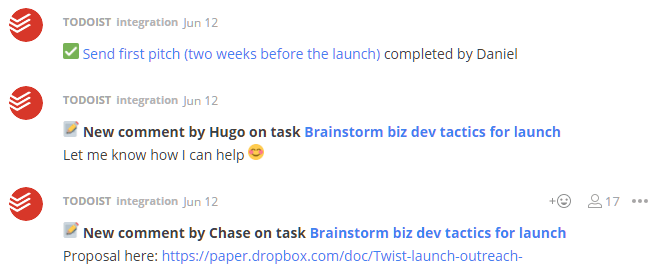
Once you’ve connected the Todoist project with the Twist thread, you’ll start to see new messages in Twist when your team adds, completes, uncompletes or comments on tasks inside the selected Todoist project. You’ll be able to see who completed which action, and will be able to immediately revisit the task in Todoist by clicking the link in the Twist thread.
Convert conversations to actionable tasks using Quick Add
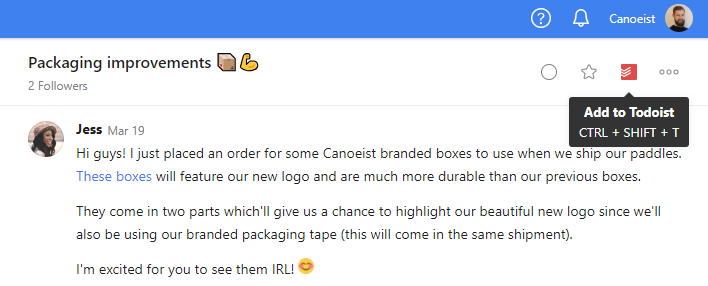
Many times, your conversations in Twist will result in actionable tasks. To keep track of these items in your to-do list, you can directly add a thread as a Todoist task from within Twist.
FAQ
If you no longer want to use Todoist with Twist, please follow the instructions in this article to remove the integration.