
Planning your week becomes so much simpler when you can see your client calls, team standups, lunch plans, and personal appointments alongside your actual tasks. The Outlook Calendar integration gives you that complete picture, helping you create schedules that actually work instead of constantly playing catch-up.
This integration connects your Outlook Calendar directly to Todoist, displaying your scheduled events in Today and Upcoming views so nothing catches you off guard. You can also sync your time-blocked tasks back to Outlook Calendar and adjust your schedule right from there when priorities shift. Having this unified view means you’ll spot scheduling conflicts before they happen and find realistic windows for focused work.
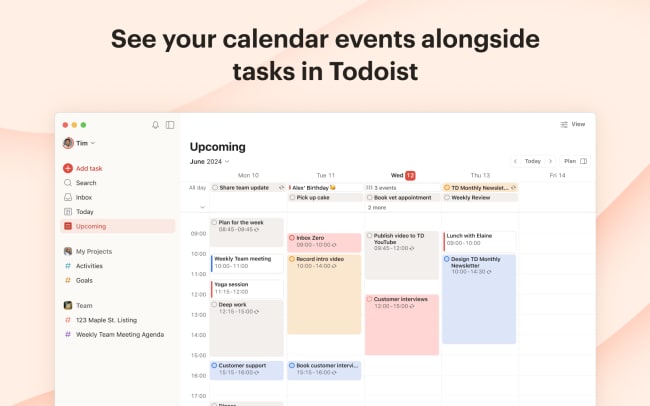
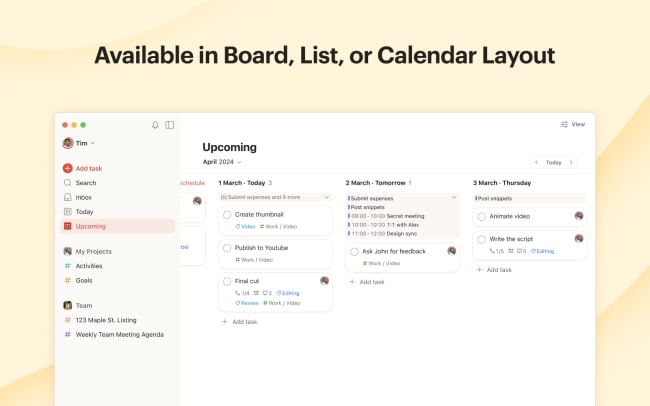
With a Todoist paid plan, you’ll see your tasks as time blocks right next to your meetings in our calendar layout, making it easy to plan balanced days, weeks, or months that leave room for both productivity and life.
📽️ Tip: Watch Hugo’s quick walkthrough to see it in action.
功能
-
See your Outlook events alongside your Todoist tasks so you can plan realistic schedules that account for both your commitments and your workload.
-
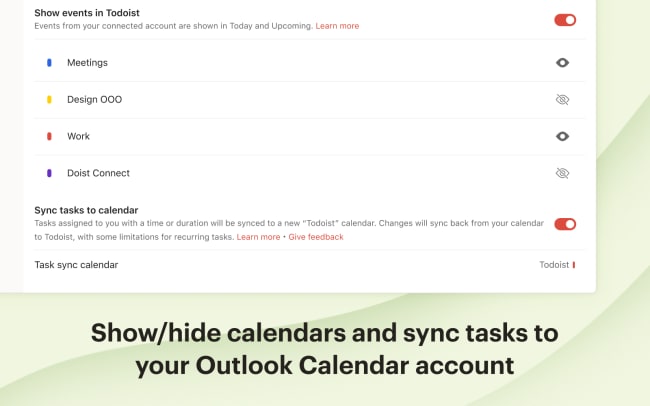
Sync your scheduled tasks to Outlook Calendar and easily reschedule them directly from your calendar when plans inevitably change.
-
Display events from multiple calendars connected to your Outlook account, and choose exactly which ones appear in Todoist.
-
Time-block your tasks around your calendar commitments using Todoist's calendar layout (available on paid plans).
-
Click on any event to open and edit it directly in Outlook Calendar.

Can’t find the integration you’re looking for?
Integrate with 1,000s of other apps via our automation partners. Or, explore our API to build your own extensions or integrations.