If you're looking to optimize the workflow between Todoist and Firefox, this Todoist extension is for you!
Installation
Install the Todoist extension in your browser here.
How to use the extension
To get a quick look at Todoist from your browser, click the Todoist icon in your extensions bar in the top right. A compact view of Todoist will appear:
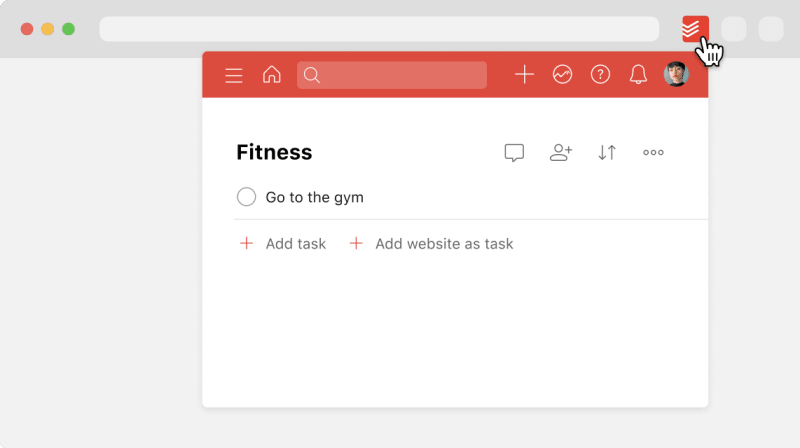
The compact view is a great way to save time: You can access any of Todoist’s features without having to leave your current web page.
- Go to the website you’d like to add as a task.
- Right-click anywhere on the page and select Add to Todoist. A pop-up window opens where you can add task details.
- Make any other changes, such as choosing a project, adding a label, or assigning a date and time.
- Click Add task to save the task.
You can add the current website as a task directly from your task list in the extension:
- Click the Todoist icon in your extensions bar in the top right.
- Click Add website as task at the end of your task list. The page title and URL are added as the task name.
- Click Add task to save the task.
Spot a quote or a paragraph you want to save to Todoist? Here’s how to capture it as a task:
- Open the website where you found the text you want to capture.
- Select the text on the page.
- Right-click the selected text and choose Add to Todoist. This opens Quick Add in a pop-up window, with the selected text as the task name.
- Make any other changes, such as choosing a project, adding a label, or assigning a date and time.
- Click Add task to save the task.
- Open Firefox.
- Right-click the Todoist icon in the top-right corner.
- Select Manage Extension.
- Click the gear icon in the top-right corner.
- Select Manage Extension Shortcuts.
- You can now set a keyboard shortcut for adding a task.
- Open Firefox.
- Right-click the Todoist icon in the top-right corner.
- Select Manage Extension.
- Click the gear icon in the top-left corner.
- Open the tab Preferences.
- Click the checkbox to the left of Set default due date for 'Today'.
Get in touch
If you’re having trouble using Firefox with Todoist, get in touch with us.